

This is a recent case where all user data was stored on a removable drive.
I don’t recommend this.
I also recommend cloud-based backup of everything.
In this case, all work was being carried out on a MacBook Pro.
All data files were stored on a 2TB external LaCie Thunderbolt drive.
The first sign of trouble occurred when the computer began to “hang” while accessing data on the drive. The client tried to transfer the data to another drive, but it stopped responding after a couple of hours.
This is almost always a sign of physical drive failure. And recovery can be VERY expensive. Potentially thousands of dollars.
The first thing I do with an external drive is to remove it from the housing. This eliminates the possibility of the external interface as a problem.
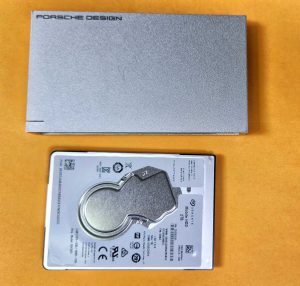
The drive is a LaCie Porsche Design.
This is a very pretty, sleek, metal case with USB3 interface. Prying it apart is an interesting process and once I got the drive out, it confirmed my concern. The drive is a conventional spinning disk Seagate 2TB model ST2000LM0207. It was manufactured December 2018. So the drive is just under 6 years old.
I have a problem with this drive design.
It is called Form Over Function.
There is no ventilation.
A conventional drive with a motor spinning the discs generates a fair amount of heat. There is almost zero space between the drive and the case. All the heat generated by the motor and electronics remains in this housing and increases over the hours it is in use. Heat is the archenemy of both motors and electronics. This likely contributed to the drive failure. There is not even one small opening anywhere for heat to escape.
The client provided a new LaCie 5TB drive for data transfer. Upon connecting both drives to my Mac Studio recovery workstation, I confirmed the new drive is also a Seagate. This is not good. Seagate is notorious for having the highest failure rate in the industry. They were the subject of a class-action lawsuit based on their abysmal failure rate in 2016 and revived in 2021. I have had more bad Seagate drives in client computers than all other brands combined. Watch the video demonstrating the design flaws in this product on our YouTube channel
I connected the failing drive to my recovery console with a high current AC / powered SATA to USB adapter. And started transferring data across Thunderbolt ports from the failing drive to the new one. After a short time, it would generate an error due to not being able to read the source files. I would power down the drive, let it cool down and start again. I added cooling packs around the drive to keep the temperature down. I transferred one folder at a time, keeping track of what was left. After 6 solid hours of work, I had almost half a terabyte of data recovered and intact.

The source drive has bad sectors, in addition to a hardware failure of either the motor or voicecoil that drives the heads. In other words, it is SHIT. The client thought there was over 1TB of data on this drive. One large folder was the Dropbox folder. It was massive. We decided to postpone the recovery of it, in hopes syncing the new MacBook to Dropbox would make those files accessible.
Nope.
The client contacted after a few days and authorized another recovery pass to get all the financial data that was missing. These files were all the Dropbox file structure. Another 5 hour meticulous recovery session retrieved another 502 GB of data. There were probably less than 100 unrecoverable files due to bad blocks on the drive. None of these were un-replaceable.
There are a couple of reasons a drive can report inaccurate data usage.
Corrupt index files. Damaged sectors on the disc can cause erroneous data usage reporting.
Recycle Bin or Trash not emptied. When you delete files, the space they occupy is still held in reserve, should you need to restore the files. The space for these files is only freed up when the Recycle Bin or Trash is emptied.
Always have a local backup in addition to a cloud based backup. We use, recommend and support BackBlaze. They are the best in the business. I have over 10 TB of data backed up in my account. Yes TEN Terabytes.





Leave a Reply
You must be logged in to post a comment.